




阅

2023-07-08
11 min read
ziyii大佬的项目(一)python 的答题练习软件
欢迎来到ziyii大佬的专场 这是一个python的答题练习软件 希望各位喜欢
示例:
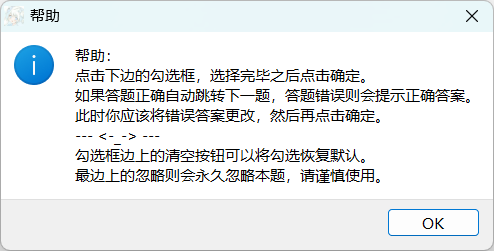
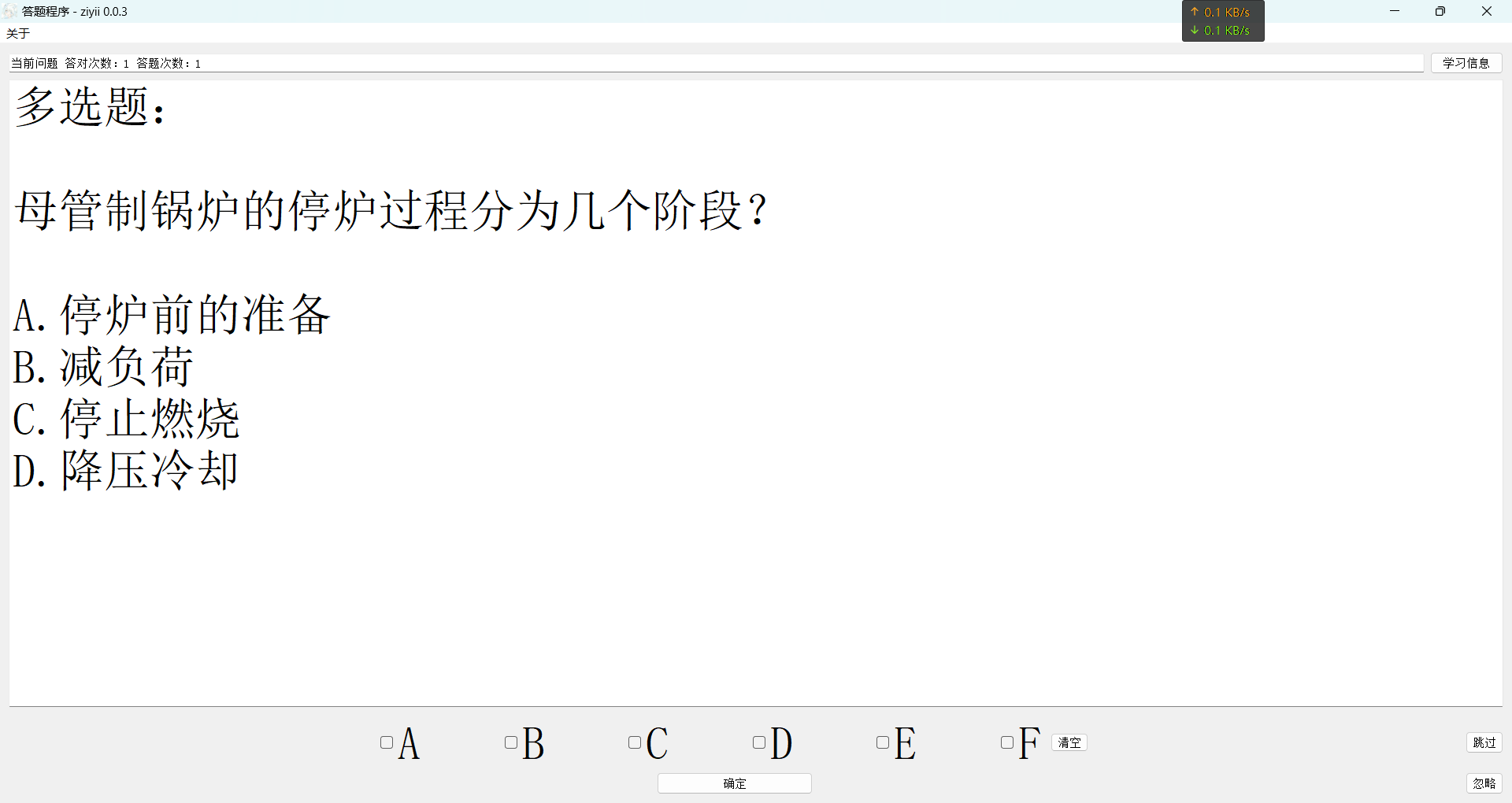
pyside2 开发32位基于 python 的答题练习软件
开发环境
win11 家庭版 x64位版本
配置环境
安装 python3.8 32 位版本。
官网下载链接:[https://www.python.org/downloads/windows/]
(https://www.python.org/downloads/windows/)(python 官网下载链接)
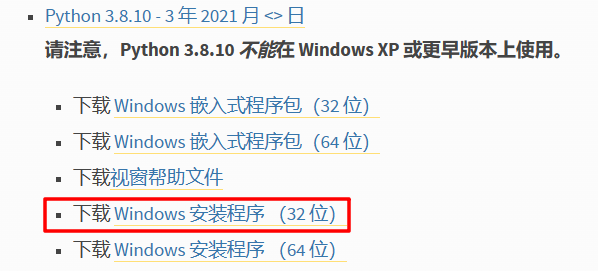
选择32位版本,可以适配win7 32位版本电脑运行。
安装包安装可以参考网上教程/一步一步的翻译安装选项。
安装 pyside2 库
pip3 install pyside2
备用:
pip install pyside2
其他安装方式请参考网络教程
开发
软件需求
- 基本的ui界面。
- 可以随机出一道题。
- 记录答题正确次数和答题次数。
- 可以跳过某些题。
- 防止按钮误触
- 学习进度查看
- ……
绘制ui
使用 pyside2 的 QT 设计师绘制ui界面。
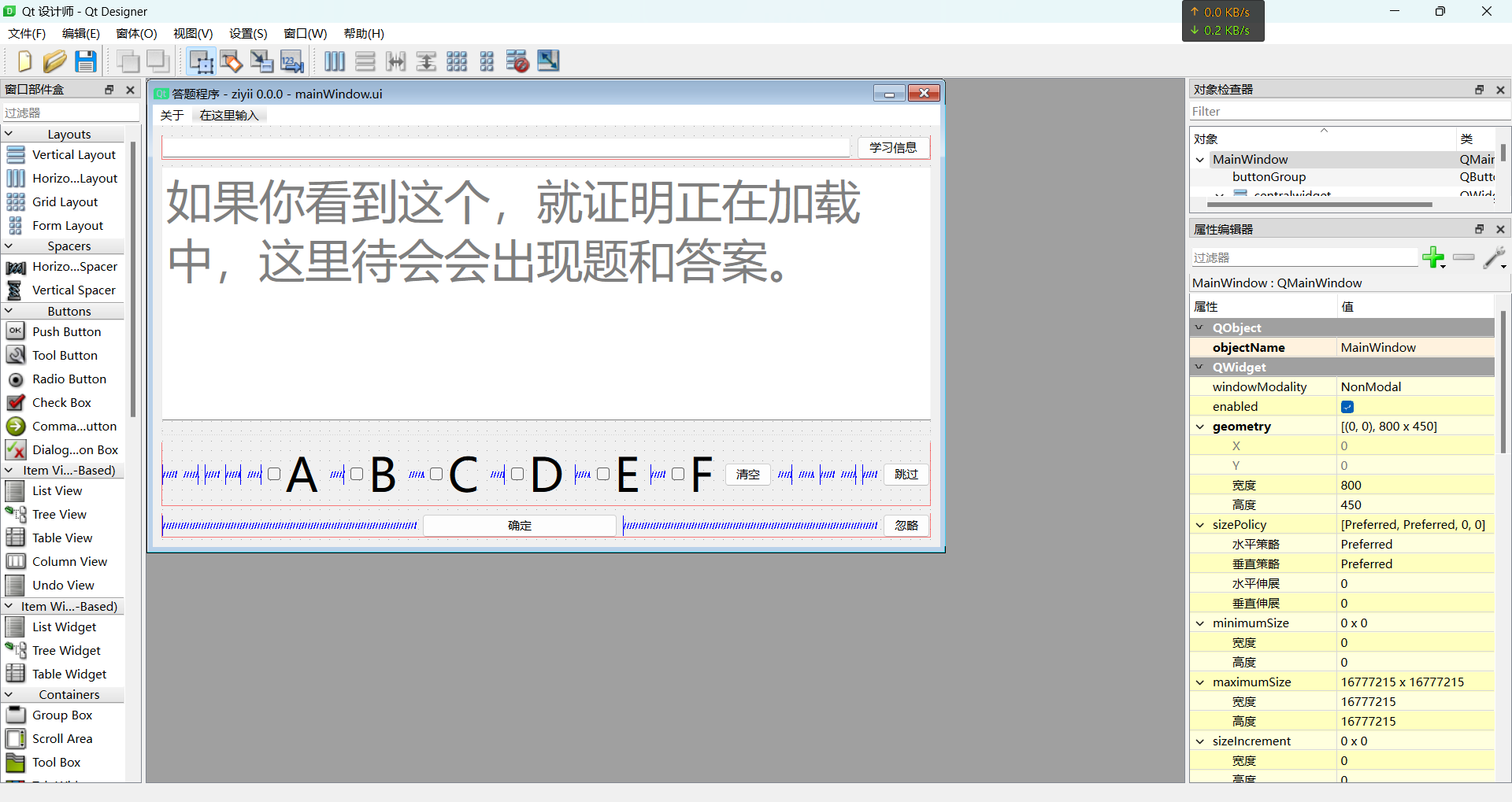
随机出题
首先确定我们的数据库。(我选择 py 自带的 sqlite3
然后是数据库的结构。

随机当然是我们的 random 库出战啦。
接下来展示下大佬的源码:
from random import randint

def MakeQuestion(self):
    """出题函数
    """

    self.data = self.databaseQueries(
        'SELECT * FROM scores WHERE "StatusCompletion" = 0;')
    # 调用数据库查询,获取全部没通过的数据。
    dataListLongInt = len(self.data)
    dataRandint = randint(0, dataListLongInt - 1)
def problemProcessing(self, problemStr: str) -> str:
    """对题进行格式化

    Args:
        problemStr (str): 原始数据

    Returns:
        str: 格式化后的数据
    """
    problemStr = problemStr[problemStr.find('、') + 1:]
    problemStr = problemStr.replace('A.', '\n\nA.')
    problemStr = problemStr.replace('B.', '\nB.')
    problemStr = problemStr.replace('C.', '\nC.')
    problemStr = problemStr.replace('D.', '\nD.')
    problemStr = problemStr.replace('E.', '\nE.')
    problemStr = problemStr.replace('F.', '\nF.')
    return problemStr

def answerProcessing(self, answer: str) -> str:
    """对答案进行格式化

    Args:
        answer (str): 原始数据

    Returns:
        str: 格式化后的数据
    """
    answer = answer.replace(' ', '')
    if answer[-1:] == ';':
        return answer[:-1]
    else:
        return answer
self.id = self.data[dataRandint][0]
# 数据库中的id(方便后期的内容修改。
problem = self.problemProcessing(self.data[dataRandint][1])
# 题目数据处理后放到变量中。
self.answer = self.answerProcessing(self.data[dataRandint][2])
# 答案处理(主要是有的答案格式不太好,得修修。
self.NumberOfCorrectAnswers = self.data[dataRandint][3]
# 这个是答对次数
self.NumberOfAnswers = self.data[dataRandint][4]
# 题目的答题次数
self.ui.lineEdit.setText(
    f'当前问题 答对次数:{self.NumberOfCorrectAnswers} 答题次数:{self.NumberOfAnswers}'
)
if len(self.answer) == 1:
    typeOfQuestion = '单选题:'
    self.ui.buttonGroup.setExclusive(True)
else:
    typeOfQuestion = '多选题:'
self.ui.plainTextEdit.setPlainText(typeOfQuestion + '\n')
self.ui.plainTextEdit.appendPlainText(problem)
# 输出ui界面
对错判断
def TurnPapersAnswer(self) -> str:
    """根据勾选框获取格式化后的答案并返回数据

    Returns:
        str: 勾选框转成答案的格式
    """
    answer = []
    checkBoxList = {
        self.ui.checkBoxA: 'A',
        self.ui.checkBoxB: 'B',
        self.ui.checkBoxC: 'C',
        self.ui.checkBoxD: 'D',
        self.ui.checkBoxE: 'E',
        self.ui.checkBoxF: 'F'
    }
    for i in checkBoxList:
        if i.isChecked():
            answer.append(checkBoxList[i])
    return ';'.join(answer)
def TurnPapers(self):
    """确定按钮的绑定函数
    """
    if time() - self.turnTime < 1:
        return
    # 根据时间戳来判断是否是误触
    # 需要 time 库
    self.turnTime = time()
    # 重置时间戳
    answer = self.TurnPapersAnswer()
    # 获取答案
    if answer == '':
        pass
        # 答案是空一定是误触啦
    elif answer == self.answer:
        if self.selection: # 这里判断本回合内是不是第一次答对,是就写入数据库数据,不是就只跳过
            self.nextProblemInit()
        else:
            self.NumberOfCorrectAnswers += 1
            self.NumberOfAnswers += 1
            self.databaseQueries(f'''UPDATE scores
SET "答对次数" = {self.NumberOfCorrectAnswers}, "答题次数" = {self.NumberOfAnswers}
WHERE id = {self.id};''')
            if self.NumberOfAnswers >= 3 and self.NumberOfCorrectAnswers / self.NumberOfAnswers > 0.7:
                # 如果第一次答对了,然后答对次数到达一定次数和正确率,则判断会了。
                self.databaseQueries(f'''UPDATE scores
SET "StatusCompletion" = 1
WHERE id = {self.id};''')
            self.nextProblemInit()
    else: # 答错之后
        self.selection = True
        self.ui.plainTextEdit.appendPlainText('\n正确答案:' + self.answer)
        self.messageBox.information(self.ui, '答案', '正确答案:' + self.answer)
        self.databaseQueries(f'''UPDATE scores
SET "答题次数" = {self.NumberOfAnswers + 1}
WHERE id = {self.id};''')
跳过题
def nextProblemInit(self):
    """下一题 初始化
    """
    self.ui.buttonGroup.setExclusive(False)
    self.checkBoxInit()
    self.MakeQuestion()
学习进度查看
def learningInformation(self):
    """学习进度计算
    """
    NumberOfCorrectAnswers = 0
    NumberOfAnswers = 0
    completionsCount = 0
    for i in self.databaseQueries('SELECT * FROM scores;'):
        NumberOfCorrectAnswers += i[3]
        NumberOfAnswers += i[4]
        completionsCount += i[5]
    self.ui.lineEdit.setText(
        f'全部问题 答对次数:{NumberOfCorrectAnswers} 答题次数:{NumberOfAnswers} 完成数:{completionsCount}'
    )
整合一下。
from PySide2.QtWidgets import QApplication, QMainWindow, QMessageBox
from PySide2.QtUiTools import QUiLoader
from PySide2.QtCore import QCoreApplication, Qt
from PySide2.QtGui import QIcon
from sqlite3 import connect
from random import randint
from time import time
from os import system


class MyWindow(QMainWindow):

    def __init__(self) -> None:
        super().__init__()
        self.ui = QUiLoader().load('./dataFormZiyii/ui/mainWindow.ui')
        self.ui.setWindowTitle('答题程序 - ziyii 0.0.3')
        self.ui.buttonGroup.setExclusive(False)
        self.messageBox = QMessageBox()
        self.data = self.databaseQueries('SELECT * FROM scores;')
        self.turnTime = time()
        self.bind()
        self.MakeQuestion()

    def bind(self):
        """事件绑定函数
        """
        self.ui.pushButtonDetermine.clicked.connect(self.TurnPapers)
        self.ui.pushButtonIgnore.clicked.connect(self.Ignore)
        self.ui.pushButtonClearOut.clicked.connect(self.checkBoxInit)
        self.ui.pushButtonLearningInformation.clicked.connect(
            self.learningInformation)
        self.ui.pushButtonPass.clicked.connect(lambda: self.nextProblemInit())
        self.ui.actionHelp.triggered.connect(
            lambda: self.messageBox.information(
                self.ui, '帮助', '''帮助:
点击下边的勾选框,选择完毕之后点击确定。
如果答题正确自动跳转下一题,答题错误则会提示正确答案。
此时你应该将错误答案更改,然后再点击确定。
--- <-_-> ---
勾选框边上的清空按钮可以将勾选恢复默认。
最边上的忽略则会永久忽略本题,请谨慎使用。'''))
        self.ui.actionAuthor.triggered.connect(
            lambda: system('start http://ziyii.top'))

    def learningInformation(self):
        """学习进度计算
        """
        NumberOfCorrectAnswers = 0
        NumberOfAnswers = 0
        completionsCount = 0
        for i in self.databaseQueries('SELECT * FROM scores;'):
            NumberOfCorrectAnswers += i[3]
            NumberOfAnswers += i[4]
            completionsCount += i[5]
        self.ui.lineEdit.setText(
            f'全部问题 答对次数:{NumberOfCorrectAnswers} 答题次数:{NumberOfAnswers} 完成数:{completionsCount}'
        )

    def Ignore(self):
        """忽略按钮对应事件函数
        """
        self.databaseQueries(f'''UPDATE scores
SET "StatusCompletion" = 1
WHERE id = {self.id};''')
        self.nextProblemInit()

    def nextProblemInit(self):
        """下一题 初始化
        """
        self.ui.buttonGroup.setExclusive(False)
        self.checkBoxInit()
        self.MakeQuestion()

    def checkBoxInit(self):
        """清空勾选框函数
        """
        self.ui.checkBoxF.setChecked(False)
        self.ui.checkBoxE.setChecked(False)
        self.ui.checkBoxD.setChecked(False)
        self.ui.checkBoxC.setChecked(False)
        self.ui.checkBoxB.setChecked(False)
        self.ui.checkBoxA.setChecked(False)

    def TurnPapersAnswer(self) -> str:
        """根据勾选框获取格式化后的答案并返回数据

        Returns:
            str: 勾选框转成答案的格式
        """
        answer = []
        checkBoxList = {
            self.ui.checkBoxA: 'A',
            self.ui.checkBoxB: 'B',
            self.ui.checkBoxC: 'C',
            self.ui.checkBoxD: 'D',
            self.ui.checkBoxE: 'E',
            self.ui.checkBoxF: 'F'
        }
        for i in checkBoxList:
            if i.isChecked():
                answer.append(checkBoxList[i])
        return ';'.join(answer)

    def TurnPapers(self):
        """确定按钮的绑定函数
        """
        if time() - self.turnTime < 1:
            return
        self.turnTime = time()
        answer = self.TurnPapersAnswer()
        if answer == '':
            pass
        elif answer == self.answer:
            if self.selection:
                self.nextProblemInit()
            else:
                self.NumberOfCorrectAnswers += 1
                self.NumberOfAnswers += 1
                self.databaseQueries(f'''UPDATE scores
SET "答对次数" = {self.NumberOfCorrectAnswers}, "答题次数" = {self.NumberOfAnswers}
WHERE id = {self.id};''')
                if self.NumberOfAnswers >= 3 and self.NumberOfCorrectAnswers / self.NumberOfAnswers > 0.7:
                    self.databaseQueries(f'''UPDATE scores
SET "StatusCompletion" = 1
WHERE id = {self.id};''')
                self.nextProblemInit()
        else:
            self.selection = True
            self.ui.plainTextEdit.appendPlainText('\n正确答案:' + self.answer)
            self.messageBox.information(self.ui, '答案', '正确答案:' + self.answer)
            self.databaseQueries(f'''UPDATE scores
SET "答题次数" = {self.NumberOfAnswers + 1}
WHERE id = {self.id};''')

    def problemProcessing(self, problemStr: str) -> str:
        """对题进行格式化

        Args:
            problemStr (str): 原始数据

        Returns:
            str: 格式化后的数据
        """
        problemStr = problemStr[problemStr.find('、') + 1:]
        problemStr = problemStr.replace('A.', '\n\nA.')
        problemStr = problemStr.replace('B.', '\nB.')
        problemStr = problemStr.replace('C.', '\nC.')
        problemStr = problemStr.replace('D.', '\nD.')
        problemStr = problemStr.replace('E.', '\nE.')
        problemStr = problemStr.replace('F.', '\nF.')
        return problemStr

    def answerProcessing(self, answer: str) -> str:
        """对答案进行格式化

        Args:
            answer (str): 原始数据

        Returns:
            str: 格式化后的数据
        """
        answer = answer.replace(' ', '')
        if answer[-1:] == ';':
            return answer[:-1]
        else:
            return answer

    def MakeQuestion(self):
        """出题函数
        """
        self.selection = False
        self.data = self.databaseQueries(
            'SELECT * FROM scores WHERE "StatusCompletion" = 0;')
        if self.data == []:
            self.ui.lineEdit.setText(f'*★,°*:.☆( ̄▽ ̄)/$:*.°★* 。')
            self.ui.plainTextEdit.setPlainText('没有啦!恭喜你全部通过啦!')
            return
        dataListLongInt = len(self.data)
        dataRandint = randint(0, dataListLongInt - 1)
        self.id = self.data[dataRandint][0]
        problem = self.problemProcessing(self.data[dataRandint][1])
        self.answer = self.answerProcessing(self.data[dataRandint][2])
        self.NumberOfCorrectAnswers = self.data[dataRandint][3]
        self.NumberOfAnswers = self.data[dataRandint][4]
        self.ui.lineEdit.setText(
            f'当前问题 答对次数:{self.NumberOfCorrectAnswers} 答题次数:{self.NumberOfAnswers}'
        )
        if len(self.answer) == 1:
            typeOfQuestion = '单选题:'
            self.ui.buttonGroup.setExclusive(True)
        else:
            typeOfQuestion = '多选题:'
        self.ui.plainTextEdit.setPlainText(typeOfQuestion + '\n')
        self.ui.plainTextEdit.appendPlainText(problem)

    def databaseQueries(self, sql: str) -> list:
        """数据库读写

        Args:
            sql (str): 传入的SQL语句

        Returns:
            list: 返回数据列表
        """
        conn = connect('./dataFormZiyii/db/problemDb.db')
        cursor = conn.cursor()
        try:
            cursor.execute(sql)
            returningData = cursor.fetchall()
        except Exception as e:
            self.messageBox.information(self.ui, '错误', f'数据库加载错误:\n{e}')
            returningData = []
            conn.rollback()
        conn.commit()
        conn.close()
        return returningData


if __name__ == '__main__':
    QCoreApplication.setAttribute(Qt.AA_ShareOpenGLContexts)
    app = QApplication([])
    app.setWindowIcon(QIcon('./dataFormZiyii/ico/ziyii.ico'))
    window = MyWindow()
    window.ui.show()
    app.exec_()
打包
|-main
|  |-dataFromZiyii
|  |	|-db
|  |  |	|-problemDb.db
|  |	|-ico
|  |  |	|-ziyii.ico
|  |	|-ui
|  |  	|-mainWindow.ui
|	 |-mainWindow.py
使用 pyinstaller 打包。
pip3 install pyinstaller
备用:
pip install pyinstaller
pyinstaller mainWindow.py --noconsole --clean --hidden-import PySide2.QtXml --icon="./dataFormZiyii/ico/ziyii.ico"
接下来是大佬的碎碎念:
为什么还有用 win7 32 位版本的啊~!
萝莉图可以留我邮箱 temp@ziyii.top